







1. What is a Tuple?
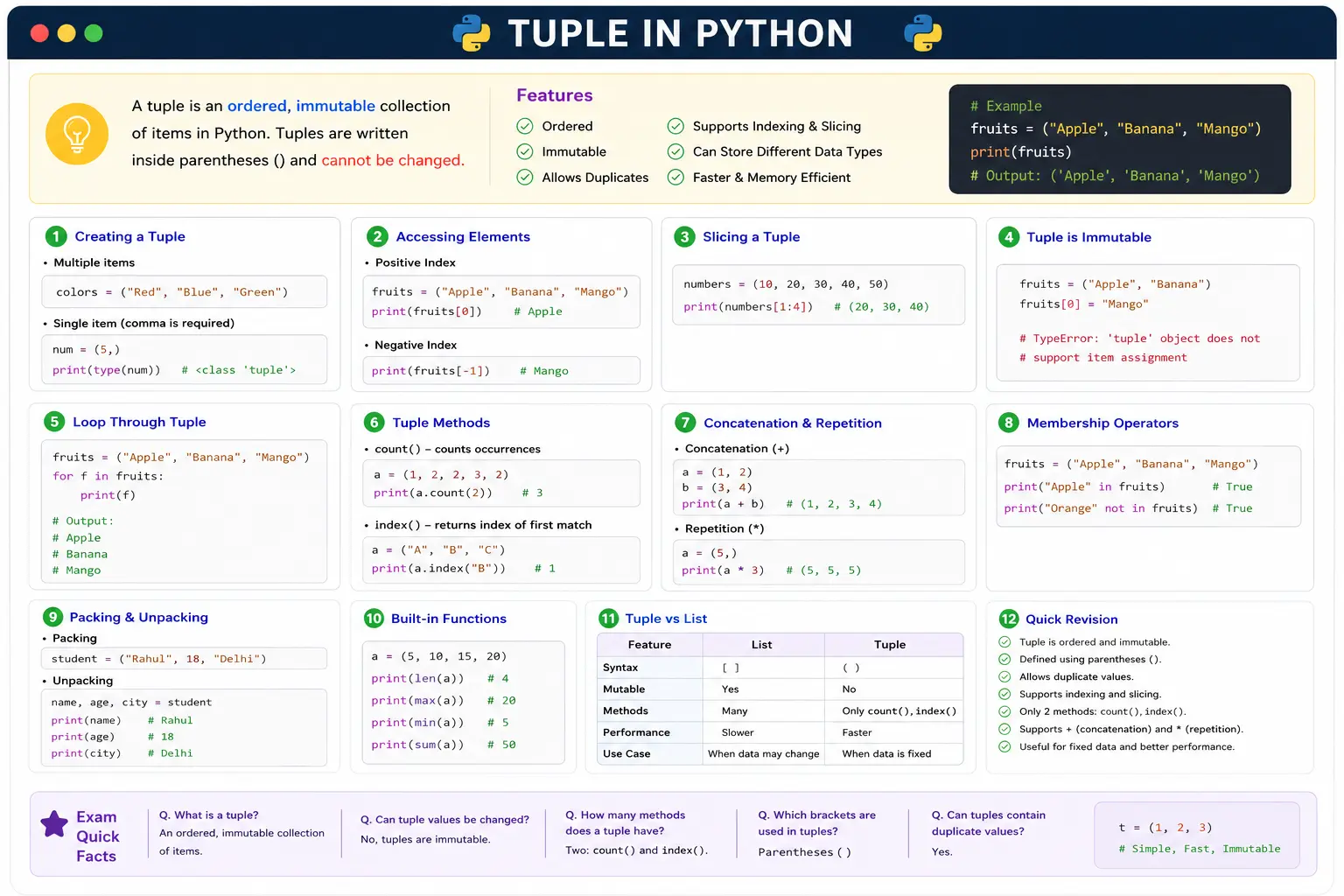
- A tuple is a collection of items.
- It stores multiple values in a single variable.
- Tuples are ordered and immutable (cannot be changed).
tuple_name = (item1, item2, item3)
Example
fruits = ("Apple", "Banana", "Mango")
print(fruits)
Output:
('Apple', 'Banana', 'Mango')
2. Features of Tuple
- Ordered
- Immutable (cannot modify items)
- Allows duplicate values
- Can store different data types
- Faster than lists
3. Creating a Tuple
Multiple items
colors = ("Red", "Blue", "Green")
Single item (comma is required)
num = (5,)
print(type(num))
4. Accessing Tuple Elements
Positive Index
fruits = ("Apple", "Banana", "Mango")
print(fruits[0])
Output
Apple
Negative Index
print(fruits[-1])
Output
Mango
5. Slicing a Tuple
numbers = (10, 20, 30, 40, 50)
print(numbers[1:4])
Output
(20, 30, 40)
7. Loop Through a Tuple
fruits = ("Apple", "Banana", "Mango")

for i in fruits:
    print(i)
8. Length of Tuple
fruits = ("Apple", "Banana", "Mango")
print(len(fruits))
Output
3
9. Tuple Methods
1.Count()
Counts how many times a value appears.
a = (1, 2, 2, 3, 2)
print(a.count(2))
Output
3
2. index()
Returns the position of an item.
a = ("A", "B", "C")
print(a.index("B"))
Output
1
3. Concatenation (+)
a = (1, 2)
b = (3, 4)

print(a + b)
Output
(1, 2, 3, 4)
4. Repetition (*)
a = (5,)

print(a * 3)
Output
(5, 5, 5)
5. Membership Operators
fruits = ("Apple", "Banana", "Mango")

print("Apple" in fruits)
print("Orange" not in fruits)
Output
True
True
10. Packing and Unpacking
Packing
student = ("Rahul", 18, "Delhi")
Unpacking
name, age, city = student

print(name)
print(age)
print(city)
11. Difference Between List and Tuple
| List | Tuple |
|---|---|
Uses [] |
Uses () |
| Mutable | Immutable |
| Slower | Faster |
| More methods | Only 2 methods (count(), index()) |
12. Advantages of Tuple
- Faster than lists
- Saves memory
- Data cannot be changed accidentally
- Good for fixed data
13. Disadvantages of Tuple
- Cannot add items
- Cannot remove items
- Cannot modify existing values
14. Important Built-in Functions
a = (5, 10, 15, 20)

print(len(a))      # 4
print(max(a))      # 20
print(min(a))      # 5
print(sum(a))      # 50